Super late this time (sorry!); but another one bit the dust, so here we go again.
This file includes the movement editor, some of my finished levels and
other miscellaneous stuff that may or may not be useful to you.
Transfering the MegaFile to your Wii:
First off, if you already have a Blast Works save file and you want to keep anything therein, BACK IT UP FIRST. Copy your save onto an SD card from your Wii, access it via your PC, then find data.bin in the directory "/private/wii/RBRE/"
and set it aside somewhere outside of the Wii-specific directory
structure, being sure to properly identify it should you want or need to
access it again.
- If you don't already have Wii data on your SD card, unzip the entire
menu tree to it's root directory. Otherwise, simply copy the
game-specific folder RBRE into the Title folder.
- It should now be visible as save data on your Wii, copy it to your system from there and you're good to go!
And don't forget....BLAST WORKS FOREVER! :)
Tuesday, April 1, 2014

Monday, January 13, 2014
Lots O Stuff
Didn't realize it had been this long since I updated here. >_>
The main thing to report is that I'm getting a bunch of my stuff ready for publishing on OUYA. Yay!
Here's a list of the ones I'm planning on bring over:
-Megatank (v2)
-Laser Carrot Attack (v2)
-Fire Arrow
-Flying V (remix/V5/OUYA Edition/whatever)
- (unnamed Space Harrier type game)
- (unnamed dragon game)
The other thing is that I started experimenting with a little paper doll animation thing that could in theory be used to build a fighting game (or something more interesting, hopefully.)


 As you can see, even only using an incomplete graphics set (no side or back views yet), it can yield some interesting results. I've even made it to export all the pertinent data for each animation frame. The issue is, though, that the amount of data that needed exporting took me aback somewhat. Somehow, an 8-frame kick animation managed to take up 900+ lines! Granted, that's with every variable hogging the whole line for itself; but still.
Basically, I'm going to have to figure out some clever loading/data crunching scheme if I ever plan to use any of this stuff.. which I would really like to.
The main thing to report is that I'm getting a bunch of my stuff ready for publishing on OUYA. Yay!
-Megatank (v2)
-Laser Carrot Attack (v2)
-Fire Arrow
-Flying V (remix/V5/OUYA Edition/whatever)
- (unnamed Space Harrier type game)
- (unnamed dragon game)
The other thing is that I started experimenting with a little paper doll animation thing that could in theory be used to build a fighting game (or something more interesting, hopefully.)
Basically, I'm going to have to figure out some clever loading/data crunching scheme if I ever plan to use any of this stuff.. which I would really like to.
Monday, April 15, 2013
Retron 3 mini review thing
I recently bought a Retron 3 to augment my classic game collection, save some space in my room and also hopefully save myself a little hassle in trying to get 20+ year old games to work. Here's my rough impressions after a solid weekend of throwing nearly every 8 and 16-bit cartridge I had on hand at this thing.
Keep in mind that the version I have is the newer one (v2?), and there are some important differences between it and the older model to consider if the Retron interests you at all.
First, the bad:
Now the good..
Now, a brief bit on the older model. From what I understand, it lacks the specific sound problems with the SNES that this one has; but has weaker compatibility and the s-video output isn't quite as good. They both have undeniable drawbacks and are likely out of the race altogether for absolute retro purists; but I think it's worth considering which has problems that concern you less.
In conclusion, it probably all depends on how bad those drawbacks are to you. Personally, while I'd really like having flawless sound emulation and everything output to s-video (or component for that matter), just having something that will play games for all three systems, play them all on the first try and only take up one AV input on my TV is definitely enough for my money.
Keep in mind that the version I have is the newer one (v2?), and there are some important differences between it and the older model to consider if the Retron interests you at all.
First, the bad:
- The included wireless controllers are functional (they'd be OK if they were all you had); but kind of cheap and flimsy. My biggest problem with them is that they require constant line-of-sight with the system's IR sensor. When I first got the system, I actually thought they had some slight input delay; but I'm pretty sure it was just the controllers moving very slightly out of range during spurts of excited button mashing (I was playing Toki, after all.)
- SNES sound output is ridiculously loud (at least 2x that of the Genesis'!) and depending on the game, can be awfully distorted as well. This video demonstrates these problems perfectly.
- NES outputs composite video only, which I'm fine with, honestly. HOWEVER, simply having the s-video outputs hooked up to your TV when playing NES games causes the colors to completely freak out. The box even recommends not having them both hooked up together at all! Basically, if you want to utilize the Retron's excellent s-video output AND play 8-bit Nintendo games on it, you'd either have to continually plug/unplug video cables when swapping between systems or have an A/B switcher on hand just for that purpose. This just perplexes me. I can very easily understand the need to cut costs for things like pack-in controllers, not having the time to totally perfect sound emulation, I can even understand why doing the additional work necessary for the NES components to output s-video might be prohibitively expensive, difficult or time-consuming; but this is just odd.
- Sound emulation is (understandably) imperfect; but it really varies on the system and game. To be fair, the majority I tried were spot on for the most part, with only the odd sound effect or two being noticeably off.
- For some inexplicable reason, 2 of the 3 standard NES pads I have flat-out don't work with the Retron.
Now the good..
- EVERY GAME I'VE PLAYED ON THE SYSTEM WORKED THE FIRST TRY! Even my most problematic NES carts, which might take 20 tries normally on the old gray box, worked right off the bat. Astounding!
- S-video output for Genesis and Super Nintendo looks absolutely fantastic.
- Speaking of video, there's no godawful RF switches to tangle with!
- Compatibility is very good overall. Many 'problem' games, such as R-Type 3 and Castlevania 3 seem to play near perfectly.
- The Retron has 2 controller ports for each system, allowing you to use any of their original controllers and accessories (for the most part.)
Now, a brief bit on the older model. From what I understand, it lacks the specific sound problems with the SNES that this one has; but has weaker compatibility and the s-video output isn't quite as good. They both have undeniable drawbacks and are likely out of the race altogether for absolute retro purists; but I think it's worth considering which has problems that concern you less.
In conclusion, it probably all depends on how bad those drawbacks are to you. Personally, while I'd really like having flawless sound emulation and everything output to s-video (or component for that matter), just having something that will play games for all three systems, play them all on the first try and only take up one AV input on my TV is definitely enough for my money.
Sunday, December 30, 2012
Fire Arrow
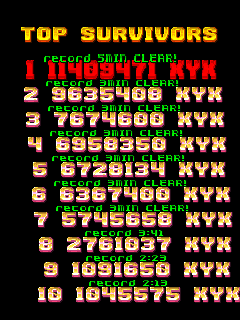
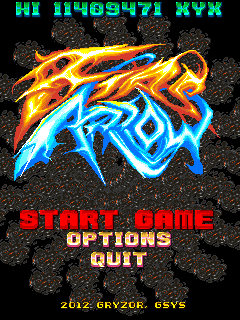


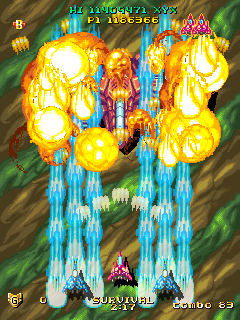
Beta
This one started as a fun little side project trying to teach my friend GML; but soon got out of hand and became it's own game. It's a short, timed survival/caravan shmup that can be played in 3 or 5 minute modes. In 3 minute mode, you get roughly half the stage and 1 boss, while in 5 you have 2 bosses to fight.
The music isn't original to this game, I was lazy and just used some favorites from my tracker/module collection. As I haven't requested explicit permission to use any of these (I thought it might be ok since there's no pretense of selling this), I'll remove any or all of them upon request if necessary.
Tracks:
Cool City by Purple Motion
The Tiara by Solaris
1234 ROCK! by Yannis Brown
Marucombat by Maruku Buranu (Marc Brown)
Hyperdyne by Static
Acronyme by Baroque
The game will also look for songs (.mod/.s3m/.it etc.) in the music folder on startup, so feel free to use your own favorites instead. :)
Sunday, October 28, 2012
Megatank EXE free now. :)
Figured it had been gathering dust too long, I decided I'd rather just have it more accessible and hopefully more people will be able to play it. Here it is.
Thanks to the few folks that actually bought it! :)
Thanks to the few folks that actually bought it! :)
Wednesday, July 25, 2012
LASER CARROT ATTACK
I was (again) thinking of methods for creating a cool DDP-like beam effect and ended up whipping up a silly little game not long after. :) I knocked it out in one night (tonight, actually), and it shows as it's easily my simplest game yet. There's basically no graphics to speak of, just blow up things with a giant rainbow laser beam of death. ENJOY.
As for other games, I'm waiting on a video converter box for my laptop so I can record footage via an external device (DVD/VCR etc.) without the messiness involved with direct screen capturing making things far more frustrating than they need to be. I plan to do one long demo reel with pretty much everything.
As for other games, I'm waiting on a video converter box for my laptop so I can record footage via an external device (DVD/VCR etc.) without the messiness involved with direct screen capturing making things far more frustrating than they need to be. I plan to do one long demo reel with pretty much everything.
Monday, June 4, 2012
LAST CHANCE demo (Win/EXE)
LINK
1 level, 3 selectable ships, and a new mode (Extreme) exclusive to this version. More detailed description @ Yoyo. Enjoy! ;)
1 level, 3 selectable ships, and a new mode (Extreme) exclusive to this version. More detailed description @ Yoyo. Enjoy! ;)
Subscribe to:
Posts (Atom)